What is Kitsune

The next-generation
CMS that replaces
WordPress.

Update your company website just by talking.

Write articles. Change service details. Rewrite prices. Add new pages. Go multilingual.
It all starts with talking to AI.

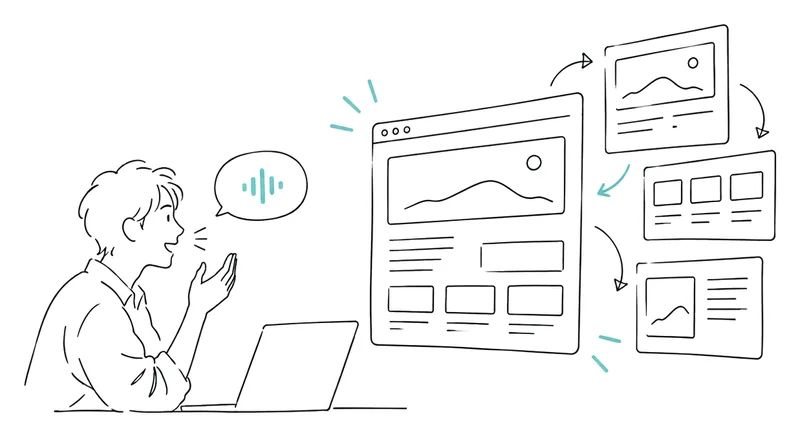
Talking to AIIllustration
Change this service to 9,800 yen a month from next month, and fix every related page too
Price updated, and the related pages are fixed too.
  • Updated the price table on the service page
  • Updated the price on the home page
  • Updated the pricing answer in the FAQ

What changes

Updating your company site
changes like this.

What you wantBeforeWith Kitsune
Fix the company profileContact your web agency and wait for the fixTell AI
Add a page for a new serviceAsk someone to do it, then prepare copy and photosTell AI
Change a priceLog in to the admin panel and fix each related page one by oneTell AI
Add an English pageOrder a translation, then upload the finished copyTell AI
  • “Change this service to 9,800 yen a month from next month, and fix every related page too.”
  • “Create a page for this new service, and add it to the home page too.”

What it is

Kitsune is a CMS built from the start
to be handled directly by AI.

Until now, a website was something a person operated one step at a time through an admin panel. WordPress is the most successful CMS built on that assumption.WordPress isn't the problem.The assumptions have changed.

Before
  1. Person
  2. Admin panel
  3. WordPress
  4. One article published
Kitsune
  1. Person
  2. AI
  3. Kitsune
  4. The whole site

Two levels

“Updating by talking”
comes in two kinds.

Everyday

Everyday operations

Writing articles. Editing text. Changing prices. Swapping images. Adding FAQs. Creating new pages. Translating.

Updates like these can be handed to AI simply by talking to it.

Development

Changing the site itself

Changing the design. Adding new features. Building search. Connecting external data. Reshaping the database.

This can also be built through conversation with AI. But it isn't just an update. It's the realm of designing what to build and how to build it.

Until now, “fix this wording” was a job for the CMS, and “add a search feature” was a job for a development company. With Kitsune, both start at the same place: a conversation with AI. The only thing that changes is the skill people need, depending on how deep the change goes.

Features

So the foundation itself
is different from WordPress.

Because it was built to be handled by AI, Kitsune ended up different from WordPress right down to its foundation.

01Fast

Fast to load

Light, with nothing extra piled on.

Every time a page opens, WordPress runs PHP, loads themes and plugins, and queries the database again and again. Kitsune has a light setup with nothing extra piled on, and is served from Cloudflare's locations around the world.

02Secure

Stronger security

Fewer ways in, by design.

WordPress has its own set of entry points: the core, PHP, themes, plugins, the database and the login page. Forget to update any one of them, and it becomes a way in.

Kitsune has no PHP, no themes and no plugins, so the number of entry points is different from the start. On top of that, you get Cloudflare's protection as is, and you can even place the admin panel behind Cloudflare's authentication.

03Low cost

Lower running costs

No more renting a server around the clock.

Keeping WordPress running comes with a whole list of ongoing costs.

  • Server
  • Database
  • Backups
  • Security measures
  • Paid plugins
  • CDN

Kitsune runs on Cloudflare, so the infrastructure cost of keeping a site running shrinks. A site with little traffic doesn't need a server running every month, and when traffic suddenly spikes, you don't need to upgrade one either.

04Freedom

Freedom of design

Build what you want instead of searching for it.

Instead of fitting your site to plugins,
build features that fit your site.

With WordPress, when you want a feature, you first go looking for “a plugin that does it.” Kitsune is different. Both the look and the features are built for your site, and changing the look later is easy too.

  • Booking system
  • Product database
  • Memberships
  • Rankings
  • External API integrations
  • AI auto-classification

Technically, it runs on Cloudflare (delivery and servers), D1 (database) and Astro (page generation).

Migration

Bring your WordPress site
just as it is.

We handle all of the migration work.

  • Posts
  • Images
  • Pages
  • Categories
  • Tags
  • URL
  • Design

You can keep your existing URLs exactly as they are, or switch to new URLs connected with 301 redirects.

Rather than hunting for the same plugins, we build what they did on Kitsune.

Why "Kitsune"

A fox can take on
many forms.

Kitsune is the same. It can become a booking site, a product database, a news site or a ranking site.
That's why we named it Kitsune, the Japanese word for fox.

Design

With Kitsune in place,
what will you have it do?

Kitsune doesn't have a “right way” to use it. What AI reads, what it creates, what gets automated and what people decide: that differs from company to company.

Corporate

For a company site

  • Build service pages from sales materials
  • Apply a price change to every related page
  • Update job listings
  • Turn past articles into an FAQ
News

For news media

  • Gather information
  • Turn it into articles
  • Translate
  • Publish
Products

For a product site

  • Update prices and stock automatically from external data
  • Generate pages in bulk from product data
Media

For specialist media

  • Read through past articles
  • Find pages that have gone stale and fix them

Who it's for

Not every website
needs Kitsune.

Not for

Sites you rarely update

Built once and almost never updated. Just a company profile and directions, touched a few times a year.

For a site like that, what you have now is enough. There isn’t much point in bringing in Kitsune.

Best for

Sites you update often

  • News media
  • Owned media
  • Corporate sites that often rewrite services, case studies or job listings
  • E-commerce sites that constantly add and fix product information
  • Sites that update information in multiple languages
  • Information sites with large numbers of articles or data

On sites like these, updating is part of the daily work. Kitsune is a CMS built to make that work far lighter.

Writing articles. Editing text. Swapping images. Changing prices. Adding new pages. Fixing outdated information in bulk. You can do all of this through a conversation with AI, without hunting around an admin panel. You don’t even need to be at a computer; you can give instructions from your smartphone.

The more often you update, the bigger Kitsune’s impact. We think it’s an especially good fit for sites whose content changes constantly, like e-commerce with products, prices, stock and campaigns. It can also be extended to change what’s shown at set times, show different information depending on conditions, or update automatically from external data.

Kitsune is less “a CMS for building websites”
and more a CMS for keeping websites running every day.

Works

This is how
we use it.

All five run on the same Kitsune. Yet each one does something completely different.

Figures as of September 11, 2026

And the biggest difference

Media like these can be designed fast, launched fast and run cheaply. Every one of the five sites above launched just two to four months ago.

The way media is built has completely changed, and we at Let'sBJJ Inc. have the know-how. That's why we can propose changing the way blogs and media are run altogether.

One example

A site that doesn't stop at publishing,
but keeps growing afterwards.

The jiu-jitsu news site “Let's BJJ World News” is one example we built on top of Kitsune. Launched in May 2026, it runs everything from article generation to translation, and even a podcast, through the flow below.

  • ~4 monthssince launch
  • 4,300+ × 5 languagesarticles generated and translated automatically
  • 2 languagesa podcast generated automatically too (Japanese and English)
  • 2,700+past articles revised in the last 30 days
  1. AI suggests what to write next

    By cross-checking analytics against published articles, AI suggests to the administrator what should be written next.

  2. The administrator sets the direction

    They review the suggestions and decide what to make and what to skip. To change the direction of the content, they just say so here.

  3. Articles are written and spread into five languages

    Articles are written automatically, then translated into English, French, Korean and Traditional Chinese and published. The previous day's news also becomes a podcast.

  4. Past articles are fixed based on how they're read

    Looking at which articles are read and which aren't, we go back and restructure past articles. Even after publishing, articles keep changing so they get read.

And then on to the next suggestion. AI's job ends at suggesting and doing the work; people decide what goes on the site.

* Anything that runs automatically, such as generating articles at set times, needs a separate server to run it, apart from Kitsune.

The biggest differences from before

  • One person is enough to maintain the site.You barely need to spend time thinking about operations or management.
  • Each writer can do far more.Neither the number of articles nor how often you update is limited by headcount. If you employ many writers, you can even reduce the team.
  • Whatever you want, you can build as it is.When you want to change the look or add a feature, there’s no need to hunt for plugins. We build what you want, for your site.
Visit letsbjj.com →

Beyond WordPress

Kitsune
is more than a blog.

It can also do things that were hard with WordPress.

Fast search

Find what you're looking for among thousands of articles, instantly.

Article search on letsbjj.com →

Custom rankings

Rank by criteria unique to your site.

Supplinow's ingredient ranking →

External data

Pull in prices and stock every day and rewrite pages.

Supplinow →

Calculations

Produce ratings and predictions from records and results.

ADCC 2026 feature →

Reader participation

Take in readers' likes and submissions, and reflect them on the site.

Gear shop directory →

Multiple languages

Publish one article in five languages at once.

letsbjj.com →

Features like these are no longer special.
WordPress simply gave you that little freedom.

Story

How Kitsune
came to be

Kitsune started out quite simply.

If we were going to build websites with AI, wouldn’t it be handier to have a shared CMS at the center? That was the first thought.

Ask AI to “build a site like this” and today it can get you a long way. But rather than building the whole structure from scratch every time, it’s far easier to have a shared foundation, like WordPress, and change only the look and features on top of it.

And there are an enormous number of WordPress sites out there. Build a CMS with a structure close to WordPress, and moving existing sites over becomes easy too. That is where Kitsune began.

The goal was never to rebuild WordPress as it is.

It was to keep WordPress’s easy-to-understand structure while making something faster, easier to secure, easier to extend, and cheaper to run.

Because Kitsune is built on Cloudflare, it doesn’t need a big server running around the clock like a traditional website. It runs at very low cost day to day, and copes easily when traffic grows. I run several sites on Kitsune myself, and the infrastructure costs are much smaller than with traditional website hosting.

As I kept using it, I realized one more important thing: building a site and updating it should both simply be easy.

Not writing a detailed spec first, locking the design, writing code and only then building the site. Instead, starting from “this is the site I want” and building it through conversation with AI.

Writing articles.
Editing text.
Adding pages.
Changing the design.
Adding the features you need.

With Kitsune as a shared CMS at the center, you no longer have to build everything from scratch each time.

We have also migrated sites from WordPress to Kitsune several times. Even a site with a large number of articles has been moved within the same day, with its look barely changed.

It looks the same. But underneath it’s new, with better speed, running costs and room to grow. You can even add features the original site never had.

So if you like your current design, there’s no need to change it. You can keep the front as it is and replace only what’s underneath.

Kitsune is especially good at content-driven websites: corporate sites, blogs, news sites and information sites.

Separately, we also develop “SubPro”, a platform dedicated to video subscriptions. It is designed for membership sites, with payments, member management and content protection built in from the start.

It is a separate system from Kitsune, but the know-how we built up there in payments, member management and security design carries over. So if you need them, we can add payments or memberships to Kitsune and customize it further for your purpose.

We have built all kinds of sites with Kitsune and used it for real migrations from WordPress. Along the way,

Fast.
Cheap.
Easy to secure.
Easy to migrate to.
Free to extend.
And easy for AI to work with.

these qualities became clear.

It had become far too good a system to keep to myself.
That’s why I decided to offer Kitsune to others.

Hiromichi Fujiwara, CEO, Let'sBJJ Inc.
Getting started

How to get started

Kitsune isn't sold as software. Getting started begins with a conversation.

From WordPress

Moving from WordPress

As described above, bring your current site as it is. We move the posts, the design and the URLs, and handle all of the migration work.

From scratch

Starting from scratch

Running it is simply easy. Just talk, and the articles keep coming.

What kind of articles, and at what pace? We work out how to run it together, starting with a conversation.

Price

Pricing is by consultation.

Kitsune can do a wide range of things. So when you ask “how much?”, we listen first, decide what to do one item at a time, and then answer. We don't charge for anything you don't need.

The monthly fee isn't just a server bill.

With WordPress
  • Server
  • Maintenance
  • Plugins
  • Security measures
  • Updates

Each set up separately, and looked after separately.

Kitsune's monthly fee
  • Hosting
  • CMS
  • Maintenance
  • AI operations platform

Everything included from the start.

FAQ

Frequently asked questions

Will my site go down during the migration?

Generally, no. We build the new site separately and switch over once you have reviewed it. Your current WordPress site keeps running right up until the switch.

What happens to the WordPress plugins I use now?

We start by reviewing the plugins you use and what each one does. Some features, such as SEO and redirects, are built in from the start; anything else you need, we build on Kitsune to do the same job. If you like, we can also add features you could never have before.

Can I update the site myself without using AI?

Yes. There is an admin panel for editing articles, pages, categories, images and SEO settings. You can update the site either by talking to AI or through the admin panel.

Will my search rankings drop?

Nobody can promise rankings. But the number one reason rankings drop after a migration is changing URLs. You can keep your existing URLs exactly as they are, or move to new URLs connected with 301 redirects. Search-engine settings such as titles, descriptions, structured data and sitemaps are built in as standard.

What happens to my current design?

We carry your current design over. You can also take the opportunity to redesign it from scratch.

Which AI should I use?

We recommend Claude Code. Whoever manages the site can work with all of it from Claude Code. If you only want AI to handle article editing, there’s also a lighter way to connect AI to just the editing side (MCP).

How much does it cost?

By consultation. Costs vary a lot with what you need, so we listen first, decide things one by one, and then give you a price. We don't charge for anything you don't need.

For agencies

For web agencies

Web production with Kitsune doesn’t have to be done by us alone. We welcome collaboration with web agencies, design firms, marketing companies and others.

Partner

The partner handles

  • Existing client relationships
  • Design
  • Planning
  • Sales
Let's BJJ

We handle

  • The CMS platform
  • AI integration
  • Migration from WordPress
  • Custom development

We also take on joint proposals, migrations and custom development built on Kitsune. If you want to make web production and operations lighter than before, we’d be glad to hear from you.

Get in touch →

Contact

Kitsune
a tool for keeping websites running.

What you have it do differs from company to company.
How could your company use its website and AI? Let's start there, together.

We use what you send only to reply to your inquiry.